Post Info
Post details such as author, date, categories, comments and reading time, in a row or a list.
On this page
The Post Info widget shows the details of the post being viewed in one line: the author, the publish date, the categories, the number of comments, an estimated reading time, or your own text. Each item can have an icon and a link. Use it above or below the title in a blog post template, or in a Loop item card.
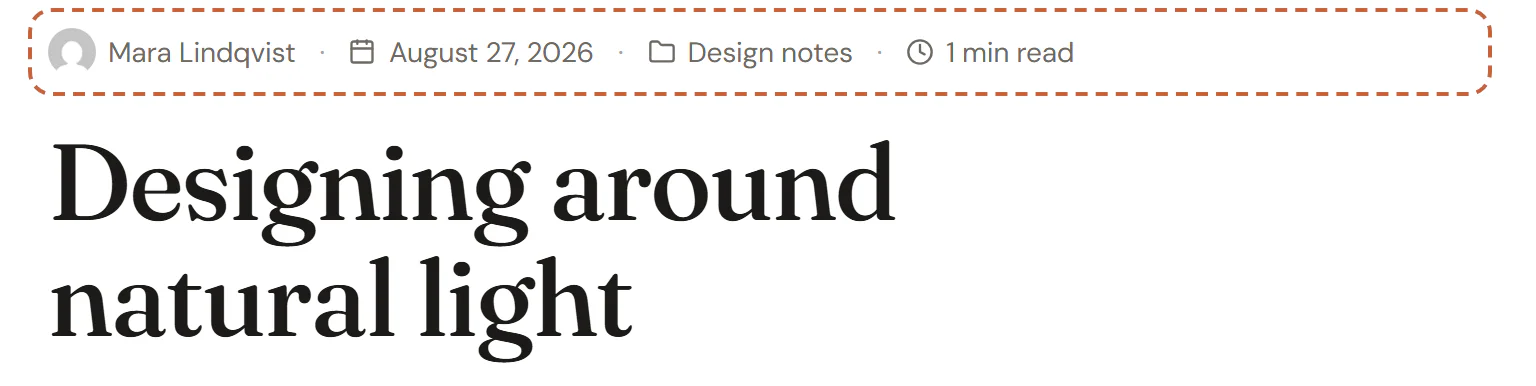
Where the details come from
Each item reads the post being viewed:
| Item | Shows |
|---|---|
| Author | The author's display name, linked to their posts. Can show their avatar instead of the icon. |
| Date, Last modified, Time | When the post was published or last updated, in the site's format or one you choose. |
| Categories, Tags, Other taxonomy | The post's terms, linked to their archives. |
| Comments | The number of comments, linked to the comments section. |
| Reading time | An estimate based on the length of the post and the Words per minute (200 by default). |
| Custom text | Any text you type, with an optional link. |
In the editor, the items show the details of the post chosen in Preview with on the Template tab of the left panel.
Add Post Info
Open your blog post template, or a Loop item, in the Theme Builder. Then open Insert in the left panel, find Post Info in the Site & theme group (or type "meta" or "info" in the search box) and drag it where you want the details. See Add elements.
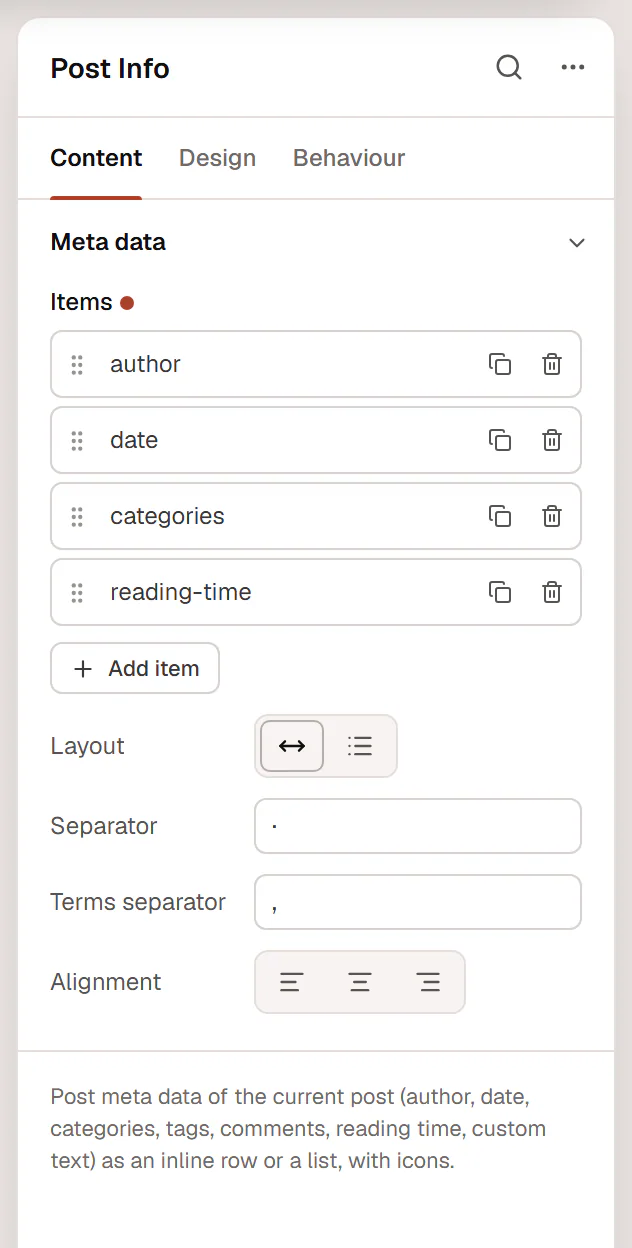
Each item is a row in Items. Click Add item, choose its Type, and open it to set the details: a Text before (such as "By"), the date Format, whether it is a Link, and its Icon.
Content tab settings
| Setting | What it does |
|---|---|
| Items | The details to show, in order. |
| Type (each item) | Author, Date, Time, Last modified, Categories, Tags, Other taxonomy, Comments, Reading time or Custom text. Default: Date. |
| Taxonomy (each item) | Which taxonomy to list. Shown for Other taxonomy. |
| Text (each item) | Your text. Shown for Custom text. |
| Link (each item) | The link of a custom text item. Shown for Custom text. |
| Text before (each item) | Text in front of the item, such as "By" or "Updated". |
| Format (each item) | For dates: Site default, March 6, 2026, Mar 6, 2026, 6 March 2026, 2026-03-06, 03/06/2026, 06/03/2026, 06.03.2026, Time ago or Custom. For times: Site default, 3:45 pm, 3:45 PM, 15:45 or Custom. |
| Custom format (each item) | A date format in PHP notation, such as l, F jS. For Custom formats. |
| Words per minute (each item) | The reading speed used for Reading time (50–1000). |
| Link (each item) | Links the author, date, terms or comments. On by default. |
| Show avatar instead of the icon (each item) | Shows the author's profile picture. Shown for Author. |
| Icon (each item) | An icon before the item. |
| Color (each item) | A color for this item. |
| Layout | Inline (one line) or List (one item per line). Default: Inline. |
| Separator | The character between inline items. Default: ·. Shown for Inline. |
| Terms separator | The text between several categories or tags. Default: a comma. |
| Alignment | Start, Center or End. Can differ per device. |
Design tab settings
| Section | Settings |
|---|---|
| Items | Typography, Text color, Link color, Link hover color, Space between items, Separator color (inline), Divider color (list). |
| Icons & avatar | Icon color, Icon size, Icon spacing, Avatar size, Avatar radius. |
The Design tab also has the sections every element shares: Spacing & position, Background & border and Mask. See Spacing, size & position.
Behaviour tab
The Behaviour tab has the settings every element shares: anchor and classes, entrance animations, motion effects, visibility per device, display conditions and interactions. See Visibility.
Tips
- Two or three items are enough for most blogs, such as the category, the date and the reading time.
- Time ago ("3 days ago") suits news; a full date is clearer for articles people read months later.