Sitemap
An HTML sitemap listing your pages, posts and categories, updated automatically.
On this page
The Sitemap widget lists your site's content in columns: pages as a tree, posts, custom post types, categories, tags or other taxonomies. It reads everything from WordPress, so it updates by itself when you publish something new. Use it on a Sitemap page or on your 404 page, to help visitors and search engines find their way.
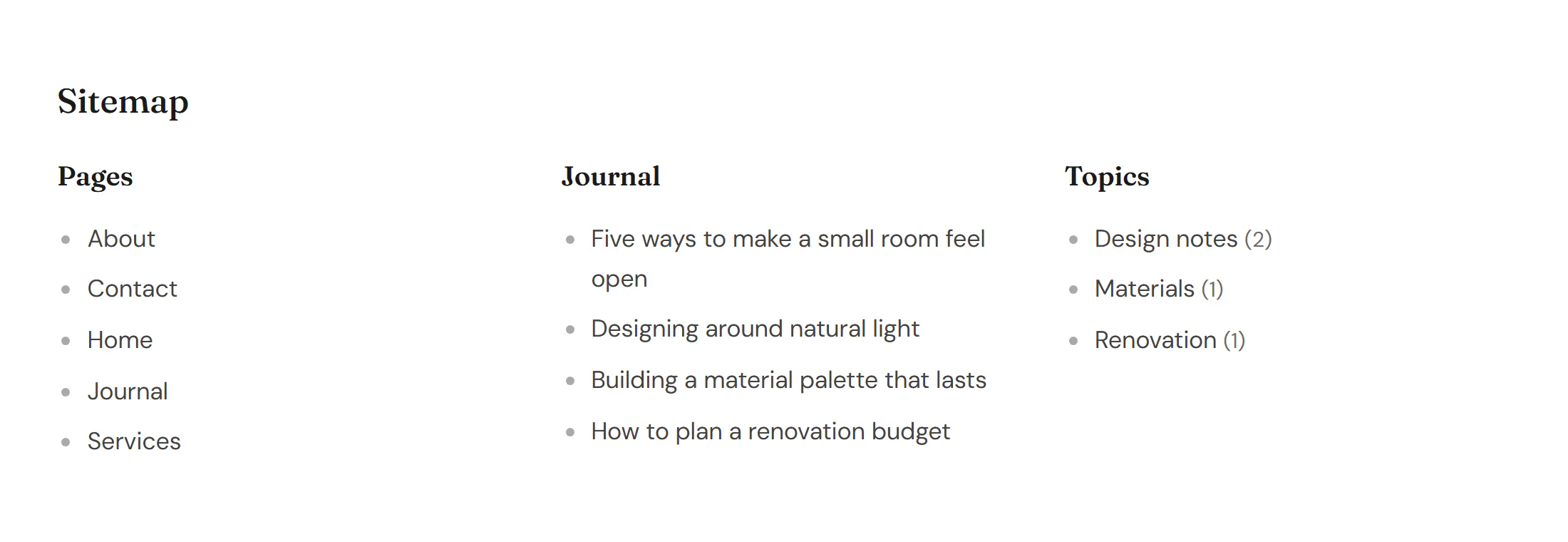
Add a Sitemap
Open Insert in the left panel and find Sitemap in the Site & theme group, or type "sitemap" in the search box. Drag it onto the canvas, or click it to add it next to the selected element. See Add elements.
A new sitemap has one section that lists your pages. Add a section for each kind of content under Sections.
Add sections
Each section is a column with a title and a list. Click Add item under Sections, then:
- Choose what it lists with List: a Post type (pages, posts…) or a Taxonomy (categories, tags…).
- Pick the Post type or Taxonomy.
- Set the order, and optionally the Depth (for pages and categories), a Maximum items and IDs to leave out in Exclude IDs.
Leave Title empty to use the content type's name, such as "Pages". Only published, public content is listed; drafts and private items never appear.
Content tab settings
| Setting | What it does |
|---|---|
| Sections | The columns of the sitemap. |
| Title (each item) | The column title. Empty: the content type's name. |
| List (each item) | Post type (pages, posts…) or Taxonomy (categories, tags…). Default: Post type. |
| Post type (each item) | Which post type to list, such as Pages or Posts. Default: Pages. Shown for Post type. |
| Taxonomy (each item) | Which taxonomy to list, such as Categories or Tags. Default: Categories. Shown for Taxonomy. |
| Order by (each item) | Title / name, Date (post types), Last modified (post types), Page order (post types), Number of posts (taxonomies) or ID. Default: Title / name. |
| Order (each item) | Ascending or Descending. Default: Ascending. |
| Depth (each item) | For pages and categories: 0 shows every level, 1 only the top level (0–10). Default: 0. |
| Maximum items (each item) | Limits the list (1–1000). Empty: all. |
| Exclude IDs (each item) | Comma-separated post or term IDs to leave out, such as 12, 34. Excluded items hide their children too. |
| Hide empty terms (each item) | Leaves out terms without posts. On by default. Shown for Taxonomy. |
| Show post count (each item) | Shows the number of posts after each term. Shown for Taxonomy. |
| Columns | 1 to 6. Empty fits as many columns as the width allows. Can differ per device. |
| Title HTML tag | H2 to H6, DIV or P. Default: H3. |
| Add rel="nofollow" to links | Usually off: a sitemap helps search engines find your pages. |
Design tab settings
| Section | Settings |
|---|---|
| Layout | Column gap, Row gap. |
| Section titles | Typography, Color, Space below, Divider line (a line under each title). |
| List | Typography, Link color (with Normal and Hover tabs), Bullet (Default (disc), Circle, Square, Dash, Chevron or None), Bullet color, Indent (for sub-levels), Space between items, Count color. |
The Design tab also has the sections every element shares: Spacing & position, Background & border and Mask. See Spacing, size & position.
Behaviour tab
The Behaviour tab has the settings every element shares: anchor and classes, entrance animations, motion effects, visibility per device, display conditions and interactions. See Visibility.
Tips
- Exclude pages visitors should not land on directly, such as a thank-you page after a form, with Exclude IDs. You find a page's ID in the address bar when you edit it in WordPress (
post=123). - This widget is a page for people. Search engines also use the XML sitemap WordPress creates at
/wp-sitemap.xml.